Stop Driving on Factory Defaults: How to Tune Your Cruise Control to Actually Fit the Way You Drive
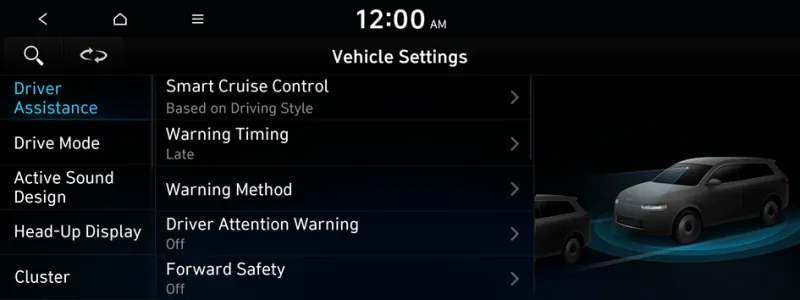
Photo: car infotainment screen showing driver assistance cruise control settings menu, via webmanual.hyundai.com
When you bought your car, the engineers at the factory made a lot of decisions for you. Seat height, mirror angles, steering feel — most of those you've probably adjusted. But there's a good chance your cruise control is still running exactly the way it left the assembly line, calibrated for a theoretical average driver who may have nothing in common with how you actually get around.
The reality is that modern cruise control systems — especially adaptive ones — come with a surprising amount of adjustability. And most drivers never touch any of it.
Let's change that.
Why Factory Defaults Aren't Designed for You Specifically
Automakers tune their cruise control systems to satisfy regulatory requirements, pass safety testing, and feel acceptable to the widest possible range of customers. That means the default settings are a compromise — not too aggressive for nervous drivers, not too laid-back for performance-oriented ones.
For a lot of people, those defaults work fine. But if you've ever felt like your adaptive cruise brakes too early, accelerates too timidly after a slowdown, or follows the car ahead too closely (or too loosely) for your comfort, you're bumping up against those factory compromises.
The good news: many of those parameters can be changed.
What You Can Actually Adjust
Following Distance
This is the most visible setting on any adaptive cruise system, and it's the one most drivers already know about — but many don't use it strategically. Following distance is typically measured in seconds of gap time (often labeled 1 through 5, or short through long), and the right setting depends heavily on context.
On a busy interstate where lane changes are frequent, a shorter gap can help prevent other drivers from constantly cutting in front of you. On a long empty stretch of highway, a longer gap gives you more reaction time and actually reduces fuel consumption by smoothing out your speed variations. Think of it less as a preference and more as a tool you adjust based on traffic density.
Acceleration Rate After a Speed Reduction
Some vehicles — particularly those from GM, Ford, and Stellantis — allow you to adjust how aggressively the system accelerates back to your set speed after slowing for traffic. In certain menus (often buried in driver assistance or cruise control settings within the infotainment screen), you'll find options ranging from "gentle" to "normal" to "sport" or similar labels.
If you drive a performance-oriented car and the default resume feels sluggish, bumping up the acceleration response can make the system feel more like an extension of your own driving style. If you're focused on fuel economy or passenger comfort, a gentler setting smooths out those transitions nicely.
Braking Sensitivity and Forward Collision Thresholds
This one is trickier, because braking sensitivity in adaptive cruise is often tied to your vehicle's broader collision warning system. Adjusting the sensitivity of when the car starts to brake for a detected obstacle can feel like a safety tradeoff — and it is, to some extent — but it's also about matching the system's behavior to real-world driving conditions.
A driver who commutes on a congested urban freeway in Los Angeles or Atlanta might find that a hair-trigger braking response creates jerky, uncomfortable driving and causes the car behind them to brake unnecessarily too. Dialing back the sensitivity slightly (while staying within safe limits) can make the system more predictable and less disruptive.
Speed Offset Settings
Here's one that surprises a lot of people: some vehicles allow you to set a speed offset, meaning the cruise control will maintain a speed a fixed amount above or below the posted limit as detected by speed sign recognition. A few European brands that sell in the US have this, and it's starting to appear in some domestic vehicles as well.
If your vehicle has speed sign recognition, check whether there's an offset option in your driver assistance menus. It's a subtle but useful way to align the system with how you naturally pace yourself on the highway.
How to Find Your Hidden Settings
The path to these adjustments varies by make and model, but here's a general roadmap:
Start with your infotainment system. Look for a menu labeled Driver Assistance, Active Safety, or Cruise Control under Settings. This is where most modern vehicles hide their adaptive cruise parameters.
Check your instrument cluster menus. Many vehicles have a separate settings menu accessible through the steering wheel controls that includes cruise-specific options not shown on the main screen.
Read your owner's manual — seriously. It sounds obvious, but the manual often describes settings that aren't labeled clearly in the menus themselves. Searching the digital PDF version for "adaptive cruise" or "following distance" can surface features you didn't know existed.
Look into third-party calibration tools. For some vehicles — particularly certain Volkswagen Group products, Subaru models, and others — aftermarket tools like OBD-based coding apps (Carista, OBDeleven, FORScan for Ford) can unlock deeper parameters that aren't accessible through the standard menus. These range from changing default following distances to adjusting the sensitivity of lane centering in combination with cruise. This is more advanced territory, but it's legal, reversible, and widely used by enthusiasts.
Matching Your Settings to Your Driving Reality
The best way to think about calibrating your cruise control is to consider where and how you actually spend most of your highway miles.
If you're a frequent long-haul road tripper covering open stretches of I-10 or I-90, prioritize a longer following distance and a gentle acceleration profile. Your goal is efficiency and low fatigue over hours of driving.
If you're a commuter on a high-density corridor like I-95 or the 405, tighten up the following distance during rush hour to reduce cut-ins, and make sure your braking sensitivity is set to respond early rather than late.
If you drive a performance car and cruise control is something you use on weekend drives through the hill country of Texas or the back roads of the Shenandoah Valley, a sportier acceleration response and a moderate following distance will feel more natural.
One Final Thought
Factory settings exist for a reason — they're a safe, sensible baseline. But your driving life isn't average, and your cruise control doesn't have to be either. Taking 20 minutes to explore what your system can actually do might be the easiest upgrade you make all year.